


Azure Hands-on Challenge Labs
Learn by doing and gain real-world cloud skills with Azure Hands-on Labs that run in a secure sandbox environment.
Risk-Free Easy Access Automatic Scoring Automatic Validation Scenario-Based
These scenario-based practical exercises will help you develop technical abilities without ever running the risk of surprise cloud bills.
Already purchased? Sign In here
Expand your learning experience and develop your Azure skills in a secure lab environment
Azure Challenge Labs - Overview
Get the hands-on experience for your next cloud job with Challenge Labs. These scenario-based practical exercises run in a secure hosted cloud environment and range from fully guided through to advanced challenges with automatic validation & scoring.

Hundreds of Labs
With a single one-off payment you get 12 months access to over 300 Azure challenge labs with many more currently in production.

Practical Experience
While beginners follow step-by-step instructions in the guided Azure labs, experts are presented with a scenario and a series of tasks.

No Surprise Bills
Develop and assess your skills without needing to create a Microsoft Azure account and without ever needing to worry about surprise cloud bills.

Easy Access
Develop and assess your Azure skills without ever needing to create your own Azure account or trial subscriptions.

Exam Prep
Get the hands-on preparation you need to pass your Azure certification exams using a secure sandbox environment

Test yourself
With advanced and expert Azure labs you can test your skills and knowledge with automated validation and scoring.
Azure Hands-on Labs Pricing
Get 12 months access to hundreds of Azure hands-on labs – with more being added regularly
Azure Challenge Labs
12 Months Access to MS Azure Library- Access to Azure Library with over 300 labs
- 365 days of access
- Secure sandbox environment - Never worry about bills
- Multiple levels: Guided, Advanced & Expert
- Immediate access to new challenge labs
- You may take each challenge three times
- Digital badges

Want Access to ALL Labs?
To access over 1000 labs (including AWS, Azure, Linux, VMware, etc) for only $199, click the button below.
Please note that you won’t be able to upgrade to the All Challenge Labs after purchasing the Azure library.
How Azure Challenge Labs work
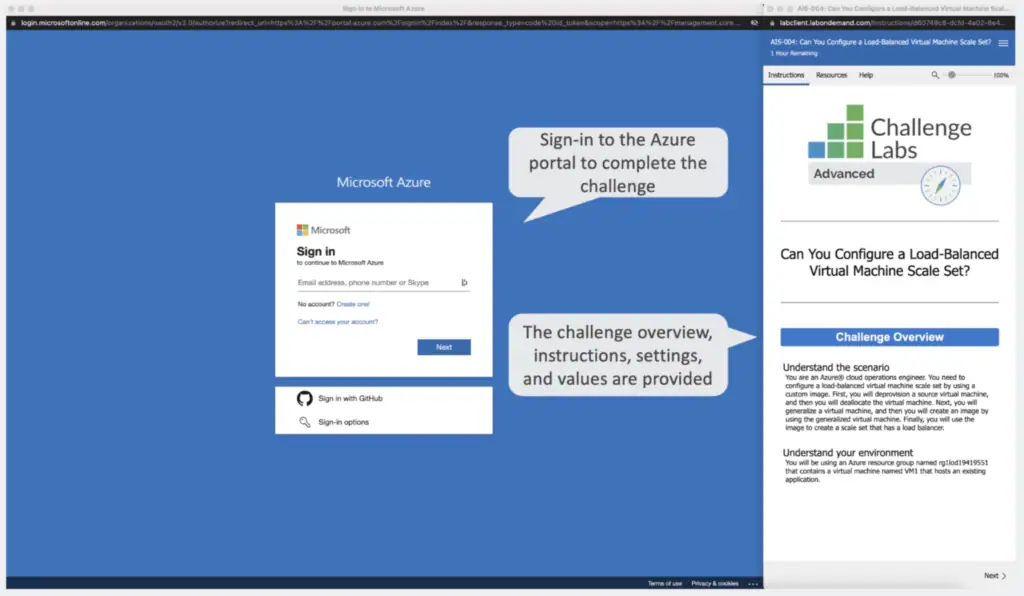
You’ll sign-into the Microsoft Azure Portal where you complete the hands-on practice exercises
When you launch a Challenge Lab you will be taken into a Microsoft sandbox environment that has been preconfigured for the specific scenario-based challenge. Depending on the skill level of the lab, you will be presented with requirements and instructions you need to follow to complete the exercise.
To launch your Azure Hands-on Lab, you’ll be signing into the Azure portal where you will find the challenge overview, instructions, settings and values.
Automated Lab Validation for accurate Learning
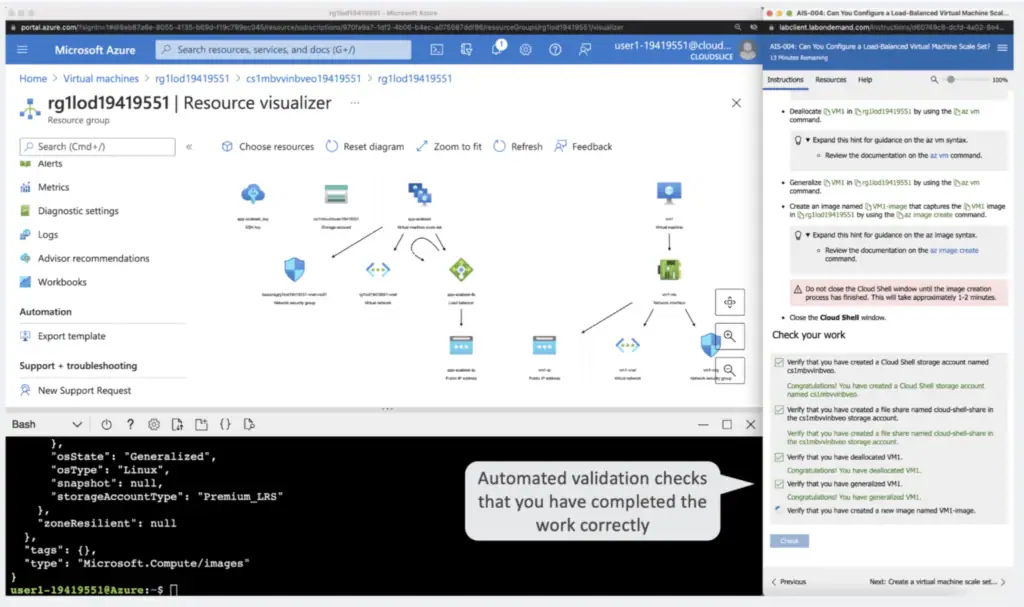
Ensure your progress with real-time checks and scoring before moving to the next step
For advanced and expert labs, you can check your work with automated validation and scoring.
The automated validation checks that the work was completed correctly before you can continue to the next step.
Ranging from fully guided to advanced hands-on challenges, these labs cater for all skill levels
Who are Azure Challenge Labs suitable for?
From complete beginners to advanced users, Azure cloud labs are suitable for anyone looking to practice and build Azure skills without worrying about a surprise cloud bill.

GUIDED
Just getting started? Simply follow the step-by-step instructions with detailed hints to learn the fundamentals in the guided Azure labs. Duration ~ 30 min

ADVANCED
Create solution according to requirements with supporting documentation – each step is checked / validated. Duration ~ 45 min

EXPERT
Create solution according to requirements with basic instructions and no supporting information – receive a final score. Duration ~ 60 min
Hundreds of Azure Challenges
Labs can be filtered by the level of difficulty, exam, certification, job role & learning path
Azure Challenge Labs Badges
Badges are online representations of your achievements – earn the recognition you deserve
Digital badges enable interested parties to view and learn more about your credentials with a single-click. When someone clicks your digital badge, an overview page is presented on Credly’s Acclaim platform.
Your Challenge Labs badge can be used to highlight your achievements across all major social networks. Sharing your Challenge Labs badge is a great way to develop your professional brand and let everyone know that you’ve completed a hands-on lab learning experience in your technical area.


Proven and Trusted
Challenge Labs are provided by Skillable, an authorized lab hoster for many partners




Frequently Asked Questions
Find answers to the most Frequently Asked Questions on Azure Hands-on Labs
How do I access the Azure Challenge Labs?
Your credentials will be emailed to you after purchasing access to the Azure Challenge Labs. Please note that these credentials are separate from your Digital Cloud Training credentials. You can then gain access to the labs through the online portal.
Do I need to create an account with Azure?
No, this is one of the best features of Azure Challenge Labs. They are delivered in risk-free hosted accounts so you don’t need to set anything up and there are no charges applicable to you.
For how long do I get access to the Azure Challenge Labs?
Every purchase includes access to all current and future Azure Challenge Labs for 12 months.
Are there any additional charges?
None at all. All services are delivered through hosted accounts so you don’t have to set up an account of your own or pay any additional costs.
How many times can I attempt each Azure Challenge Lab?
You can attempt each Lab up to 3 times within the 180 day access period.
What is the refund policy?
Please read our Refund Policy prior to making a purchase. Refunds are not possible for Challenge Labs as Digital Cloud Training is charged by Skillable for all student registrations and must pass on those costs.
Can I upgrade to the All Challenge Labs?
Upgrades are not possible as each purchase is an independent subscription. For best value, we recommend the All Challenge Labs with access to over 1000 labs – simply the best value for money.
Is there support available for Challenge Labs?
A support request can be submitted using the Open Support Ticket Request form located on the Skillable customer support page. Support includes any issues with the functionality or accessibility of the labs. Support does not include subject matter expertise or assistance understanding the topics or material Included in a specific lab.
How do these Labs compare to labs offered by competitors?
The Challenge Labs from Skillable are a highly innovative product that includes multiple difficulty levels, automatic activity-based assessments, and real-time scoring. We chose to partner with Skillable as we believe they offer the most robust and reliable hands-on labs product on the market.
Customer Reviews
Check out the excellent reviews from our students who set themselves apart from the competition

Absolutely loved the convenience and simplicity of Azure Hands-On Labs course and was impressed with the number of the labs that are on offer.

Fantastic learning experience. Labs are very user friendly and thanks to the search functions in the library I can easily identify my interest area.

Guided labs are very intuitive and easy to follow. Great way to prepare for Azure certifications and gain practical experience with MS Azure.
Featured Azure Challenge Labs
Check out the featured Azure Challenge Labs for popular Azure Certifications
Microsoft Azure Fundamentals (AZ-900) Hands-on Labs
Configure Azure Disk Encryption [Guided]
In this challenge lab, you are asked to enable Azure Disk Encryption on an Azure virtual machine. To start out, you will create a virtual machine. Then, you will add a data disk to the virtual machine. Finally, you will enable Azure Disk Encryption.
Create an Azure Logic App [Guided]
In this Azure challenge lab, you will develop an Azure Logic App using messaging services. First, you will deploy a logic app. Next, you will test the Logic App by consuming queue messages.
Enable High Availability by Using Availability Sets [Guided]
In this hands-on lab, you will create and deploy multiple Azure VMs to an Availability Set for High Availability and Load Balancing
Implement a Network Security Group [Guided]
In this Azure lab, you will create and configure a network security group. First, you will create a network security group. Then, you will associate the network security group to a subnet. Finally, you will add security rules to the network security group.
Install and Configure Azure AD Connect [Guided]
In this Azure challenge, you will configure synchronization of your Active Directory Domain Services (AD DS) user accounts to a new Azure Active Directory (Azure AD) tenant. First, you will create a new Azure AD tenant. Next, you will configure a global administrator account to use for Azure AD synchronization. Finally, you will install and configure Azure AD Connect.
Can You Automate Deployment of Virtual Machines? [Advanced]
In this hands-on challenge, you will deploy an Azure virtual machine by using a modified Azure Resource Manager quickstart template. Next, you will configure Azure Cloud Shell, and then you will deploy a virtual machine by using Azure PowerShell commands. Finally, you will deploy a virtual machine by using Azure CLI 2.0 commands.
Microsoft Azure Administrator (AZ-104) Hands-on Labs
Configure Azure Disk Encryption [Guided]
In this challenge lab, you are asked to enable Azure Disk Encryption on an Azure virtual machine. To start out, you will create a virtual machine. Then, you will add a data disk to the virtual machine. Finally, you will enable Azure Disk Encryption.
Create an Azure Logic App [Guided]
In this Azure challenge lab, you will develop an Azure Logic App using messaging services. First, you will deploy a logic app. Next, you will test the Logic App by consuming queue messages.
Enable High Availability by Using Availability Sets [Guided]
In this hands-on lab, you will create and deploy multiple Azure VMs to an Availability Set for High Availability and Load Balancing
Implement a Network Security Group [Guided]
In this Azure lab, you will create and configure a network security group. First, you will create a network security group. Then, you will associate the network security group to a subnet. Finally, you will add security rules to the network security group.
Install and Configure Azure AD Connect [Guided]
In this Azure challenge, you will configure synchronization of your Active Directory Domain Services (AD DS) user accounts to a new Azure Active Directory (Azure AD) tenant. First, you will create a new Azure AD tenant. Next, you will configure a global administrator account to use for Azure AD synchronization. Finally, you will install and configure Azure AD Connect.
Can You Automate Deployment of Virtual Machines? [Advanced]
In this hands-on challenge, you will deploy an Azure virtual machine by using a modified Azure Resource Manager quickstart template. Next, you will configure Azure Cloud Shell, and then you will deploy a virtual machine by using Azure PowerShell commands. Finally, you will deploy a virtual machine by using Azure CLI 2.0 commands.
Developing Solutions for Microsoft Azure (AZ-204) Hands-on Labs
Access a Public Storage Container from an ASP.NET Web App [Guided]
In this cloud challenge, you will write code to access an Azure Storage account used by the web app. First, you will write code in Visual Studio to create a container that has public blob access, and then you will upload test files to the container. Next, you will write code to retrieve the URLs of the uploaded files. Finally, you will test the configuration by using a test page provided with the web app.
Configure application insights and App Service Logs for a Web App [Guided]
In this challenge lab, you will create and deploy an Azure web app that includes Application Insights and App Service logs. First, you will create a web app, and then you will deploy the source code for the web app. Next, you will enable Application Insights for monitoring. Finally, you will enable App Service logs for auditing and debugging.
Can you manage PaaS Storage Services to support an application? [Advanced]
In this Azure lab, you will deploy storage services to support a custom application, deploy a Storage Table and a Storage Queue. and configure a web application to use both services.
Can You Provision NoSQL Data for a Web App? [Advanced]
In this hands-on lab, you will provision an Azure Cosmos DB account and database, and configure a web app to use the database, provision an Azure Search service and configure it to index the Cosmos DB database, and configure a web app to use the Search service.
Can You Manage Security for Virtual Machines and Databases? [Expert]
In this Azure hands-on lab, you will manage security for virtual machines and databases. First, you will create a virtual machine, and then you will enable security recommendations for the virtual machine. Next, you will enable Azure Defender for SQL for a new Azure SQL database, and then you will perform a vulnerability assessment. Finally, you will deploy an Azure Cosmos DB account, and then you will use role-based access control (RBAC) to control security access to the Azure Cosmos DB account.
Can You Manage, Monitor, and Secure Azure Platform Services? [Expert]
In this challenge lab, you will provision, manage and secure resources for a line of business web application, provision an Azure Web App, an Azure Web Job, an Azure Storage Account, and an Azure Key Vault, configure monitoring for the web app, configure security for the storage account and a pre-existing Azure SQL Database, and use the key vault to store connection strings for the web app.
Microsoft Azure Architect Technologies (AZ-303) Hands-on Labs
Configure Geo-Replication for Your Database [Guided]
In this guided Azure lab, you will create a new Azure SQL Database and enable it for Geo-Replication.
Configure Continuous Deployment by Using GIT and Deployment Slots [Guided]
In this guided Azure challenge, you will deploy a web app with configure Continuous Deployment using GIT and Deployment Slots.
Can You Configure and Control Network Traffic? [Advanced]
In this advanced hands-on challenge, you will configure and control network traffic. First, you will configure Azure virtual network peering. Next, you will configure an Azure VNet-to-VNet connection. Finally, you will configure an Azure load balancer.
Can You Implement Security for an Azure Web App? [Advanced]
In this advanced challenge lab, you will allow developers to create a secure web app. First, you will configure account security by using role-based access control. Next, you will create a web app. Finally, you will create a new virtual network, and then you will integrate the web app with the virtual network.
Can You Manage Azure Network Connectivity and High Availability of Resources? [Expert]
In this expert challenge lab, you will configure Azure networking and high availability. First, you will create an Azure virtual network (VNet), and then you will implement Azure virtual network routing and Azure security groups. Next, you will configure Azure virtual network peering, and then you will configure VNet-to-VNet connections. Finally, you will implement Azure backups for an Azure virtual machine, and then you will create an Azure virtual machine snapshot.
Can You Create, Manage, and Monitor Azure Virtual Machines and Storage? [Expert]
In this Azure expert challenge, you will implement, manage, and monitor Azure storage and virtual machines. First, you will create and manage an Azure storage account, and then you will configure monitoring for an Azure storage account. Next, you will deploy an Azure virtual machine. Finally, you will configure monitoring for an Azure virtual machine.
Microsoft Azure Architect Design (AZ-304) Hands-on Labs
Configure Application Insights and App Service Logs for a Web App [Guided]
In this hands-on cloud lab, you will create and deploy an Azure web app that includes Application Insights and App Service logs. First, you will create a web app, and then you will deploy the source code for the web app. Next, you will enable Application Insights for monitoring. Finally, you will enable App Service logs for auditing and debugging.
Configure Virtual Network Connectivity by Using Peering [Guided]
In this Azure challenge, you will create multiple virtual networks and peering connections for secure bidirectional communication. First, you will create an Azure virtual network by using the Azure portal. Next, you will create an Azure virtual network by using Azure Cloud Shell. Finally, you will configure virtual network peering connections for secure bidirectional communication.
Can You Populate Azure SQL Database by Using Azure Data Factory? [Advanced]
In this advanced hands-on labs exercise, you will design a new Azure data factory instance that supports a data pipeline. First, you will deploy an Azure data factory. Next, you will create an Azure SQL database that will hold the data output from a pipeline, and then you will author multiple activities in a data pipeline. Finally, you will debug and publish the data pipeline.
Can You Design an Azure Synapse Analytics Solution? [Advanced]
In this advanced cloud challenge, you will design a new Azure Synapse Analytics SQL pool. First, you will deploy a Synapse SQL pool on a new logical server. Next, you will design the SQL pool for performance by using workload management, and then you will query the data in the data warehouse tables. Finally, you will monitor and audit the data access.
Can You Implement Data Movement with Azure Data Factory? [Advanced]
In this Azure lab, you will provision a new Azure data factory that supports a data pipeline. First, you will deploy an Azure data factory. Next, you will create a storage account that uses a Data Lake Storage hierarchical namespace, and then you will create a data pipeline. Finally, you will author a copy data activity that will send data output through the data pipeline, and then you will test the data pipeline.
Can You Deliver Secure Services to Your Organization? [Expert]
In this expert challenge lab, you will implement an Azure API Management Instance, modify/test App Service Securing, and then import, test and publish an API.
Microsoft Azure Security Technologies (AZ-500) Hands-on Labs
Configure Authentication for an Azure Web App [Guided]
In this guided challenge lab, you will create an Azure web app that uses authentication. First, you will create an Azure web app. Next, you will deploy a sample web app, and then you will test the web app. Finally, you will enable authentication by using Azure Active Directory.
Enable Azure Defender for SQL in an Azure SQL Database [Guided]
In this Azure challenge lab, you will create a new Azure SQL database and enable Azure Defender for SQL. First, you will create an Azure SQL database. Next, you will enable Azure Defender for SQL. Finally, you will verify the security features of Azure Defender for SQL.
Can You Configure Network Security to Allow Application Traffic? [Advanced]
In this hands-on challenge, you will configure a secure network that contains multiple Azure virtual machines in a multi-tier architecture. First, you will create a virtual network for each tier, and then you will implement peering for internal communication. Next, you will create a virtual machine for each tier. Finally, you will configure a network security group (NSG) for the web tier, and then you will test the configuration.
Can You Configure Multi-Scope Resource Permissions? [Expert]
In this expert challenge lab, you will configure role-based access control (RBAC) roles that will allow users to create and deploy Azure resources. First, you will assign roles at the resource group scope for two users. Next, you will create a virtual network as one of the users, and then you will create a virtual machine as the other user. Finally, you will assign a role at the resource scope, and then you will verify the security configuration.
Can You Configure Multi-Scope Network Security? [Advanced]
In this hands-on cloud lab, you will create Azure virtual machines that use multi-scope network security. First, you will create a virtual network that includes two subnets, and then you will create a network security group. Next, you will create two virtual machines, one for each subnet. Finally, you will verify the network security configuration.
Can You Implement Security for an Azure Cosmos DB Account and a Storage Account? [Advanced]
In this Azure hands-on lab, you will implement security for an Azure Cosmos DB account and a storage account. First, you will deploy an Azure Cosmos DB account, and then you will create a container in a new database. Next, you will create a storage account, and then you will create a container in the storage account. Finally, you will generate a shared access signature (SAS) key for secure access to the storage account, and then you will assign a role to a user for secure access to the Azure Cosmos DB account.